Instructions
Find easy to follow instructions
GSAP guide
All GSAP animations used in this template are collected here. On this page, you’ll find guidance on how to locate and edit them. Each code block comes with extra notes to make it easier to understand.
You can find the code in the Embed Code inside this template.
Step 1 - GSAP package
<-- LIBRARY PACKAGE -->
<script src="https://unpkg.com/lenis@1.3.1/dist/lenis.min.js"></script>
<script src="https://cdn.jsdelivr.net/npm/gsap@3.14.1/dist/gsap.min.js"></script>
<script src="https://cdn.jsdelivr.net/npm/gsap@3.14.1/dist/SplitText.min.js"></script>
<script src="https://cdn.jsdelivr.net/npm/gsap@3.14.1/dist/ScrollTrigger.min.js"></script>
<script src="https://cdn.jsdelivr.net/npm/gsap@3.14.1/dist/Draggable.min.js"></script>
<script src="https://cdn.jsdelivr.net/npm/gsap@3.14.1/dist/InertiaPlugin.min.js"></script>
Step 2 - All heading text animations
 gsap.registerPlugin(SplitText);

  const heroHeadings = document.querySelectorAll(".text-heading-hero");

  heroHeadings.forEach((el) => {
    const split = new SplitText(el, { type: "chars" });

    gsap.fromTo(
      split.chars,
      {
        opacity: 0,
        filter: "blur(18px)"
      },
      {
        opacity: 1,
        filter: "blur(0px)",
        duration: 1.25,
        ease: "power2.out",
        stagger: {
          each: 0.04,
          from: "random"
        }
      }
    );
  });


  //SCROLL

  gsap.registerPlugin(ScrollTrigger, SplitText);

  const headingGroups = [
    { section: ".wrapper-about", heading: ".text-heading-about" },
    { section: ".wrapper-service", heading: ".text-heading-service" },
    { section: ".wrapper-team", heading: ".text-heading-team" },
    { section: ".wrapper-testimoni", heading: ".text-heading-testimoni" },
    { section: ".wrapper-cta", heading: ".text-heading-cta" },
    { section: ".main-content-service", heading: ".text-tittle-service" },
  ];

  headingGroups.forEach(({ section, heading }) => {
    const sectionEl = document.querySelector(section);
    if (!sectionEl) return;

    const headings = sectionEl.querySelectorAll(heading);
    if (!headings.length) return;

    headings.forEach((el) => {
      const split = new SplitText(el, { type: "chars" });

      gsap.fromTo(
        split.chars,
        {
          opacity: 0,
          filter: "blur(10px)"
        },
        {
          opacity: 1,
          filter: "blur(0px)",
          ease: "none",
          stagger: {
            each: 0.03,
            from: "start"
          },
          scrollTrigger: {
            trigger: sectionEl,
            start: "top 80%",
            end: "top 40%",
            scrub: false
          }
        }
      );
    });
  });
Step 3 - All tagline animations
//ANIMATIONS TAGLINE

  gsap.registerPlugin(ScrollTrigger, SplitText);

  const taglines = [
    ".text-tagline-hero-mini",
    ".text-tagline-section.about",
    ".text-tagline-section.service",
    ".text-tagline-section.team"
  ];

  taglines.forEach(selector => {
    document.querySelectorAll(selector).forEach(el => {
      const split = new SplitText(el, { type: "chars" });

      gsap.fromTo(
        split.chars,
        {
          opacity: 0,
          filter: "blur(10px)"
        },
        {
          opacity: 1,
          filter: "blur(0px)",
          duration: 0.8,
          ease: "power2.out",
          stagger: {
            each: 0.03,
            from: "random"
          },
          scrollTrigger: {
            trigger: el,
            start: "top 85%",
            once: true
          }
        }
      );
    });
  });
Step 4 - Review section draggable for mobile
 //=================================
  // DRAGABLE
  //=================================
        document.addEventListener("DOMContentLoaded", () => {
        const track = document.querySelector(".testimonial-container");
        if (!track) return;

        gsap.registerPlugin(Draggable);

        const mm = gsap.matchMedia();

        mm.add("(min-width: 320px) and (max-width: 428px)", () => {
          const draggable = Draggable.create(track, {
            type: "x",
            bounds: ".wrapper-testimoni",
            inertia: true,
            inertiaResistance: 10,
            inertiaDuration: { min: 0.5, max: 2 },
            inertiaEase: "power2.out",
            edgeResistance: 0.85
          });

          // cleanup saat keluar dari breakpoint
          return () => {
            draggable[0].kill();
            gsap.set(track, { x: 0 }); // optional reset posisi
          };
        });
      });
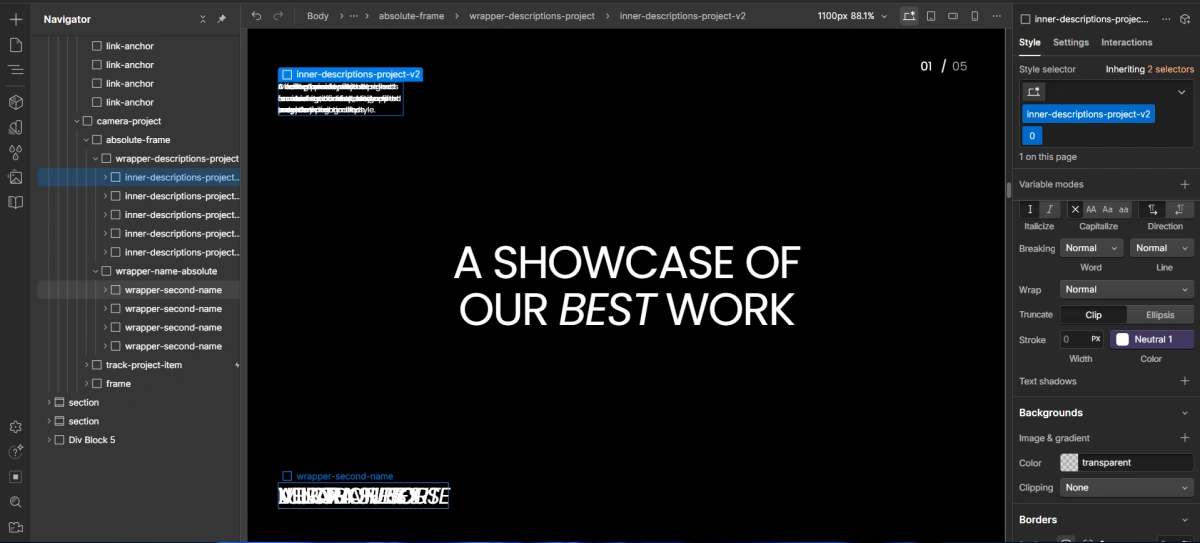
Note for project sections
If you want to change the description text or project name, you need to open several div blocks first by following the image below.